
There was a time I couldn’t finish a book to save my life.
Not because I didn’t love reading. I did. But every few pages, I’d hit a word I didn’t know, or a sentence that made sense word-by-word but somehow said nothing to me. I’d stop, look it up, scribble the meaning in the margin, and try to pick up where I left off.
A few pages later, it would happen again.
Eventually the stopping-and-searching became more exhausting than the book itself. I had a graveyard of half-read books to prove it.
Today that’s not my life anymore. Using Kindle and ChatGPT together, almost 700 days later, reading has gone from a chore to a habit I actually protect. Here’s exactly what changed — and how you can copy the system in an afternoon.
Table of Contents
The Real Problem Wasn’t the Books. It Was the Friction
I still love physical books — the weight of them, the pages turning, watching your bookmark creep toward the end. But physical books had one flaw I couldn’t fix: every time I hit something confusing, the entire reading experience stopped.
The cycle looked like this:
Read → get confused → stop → search elsewhere → understand → try to find your place again → lose the flow.
The harder the book, the more often this happened. And a book that fights you every ten minutes is a book you eventually put down “for now” — and never pick back up.
I didn’t need more willpower. I needed less friction. That’s exactly what Kindle and ChatGPT ended up solving, in two very different ways.
Switching to the Kindle App Was the First Real Fix
I don’t own a Kindle e-reader. I read on the Kindle app, first on my phone, later on a tablet — and that switch to a bigger screen made reading noticeably more comfortable.
But the screen wasn’t the game-changer.
Tracking my reading was.
Why tracking a reading habit works
This idea comes straight from Atomic Habits by James Clear: when you can see evidence that you’re showing up, you get an extra reason to keep going.
That’s exactly what happened to me:
- One day of reading turned into several.
- Several days turned into weeks.
- Weeks turned into months.
By the time I wrote this, I’d logged almost 700 consecutive days of reading in the Kindle app. That streak matters more to me than the number of books finished — because it’s proof of consistency, not motivation. I didn’t wake up one day loving reading. I just kept showing up, and the habit built itself.
Then I added the piece that turned this into a full Kindle and ChatGPT system.
Adding ChatGPT Turned Kindle Into a Reading Companion
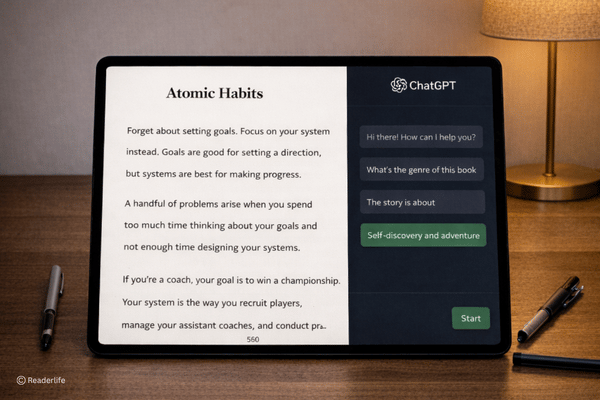
Here’s the actual workflow: I read on the Kindle app on my tablet, with a ChatGPT window open right next to it. The moment I hit a word, sentence, or idea I don’t understand, I copy it straight from Kindle and paste it into ChatGPT with a simple prompt:
- “Explain this in simple language.”
- “What does this word mean in this context?”
- “Explain this paragraph like I’m a complete beginner.”
That’s it. No closing the book. No switching apps to search five different sites. Just a quick pause, a clear answer, and back to reading. This is the core of the Kindle and ChatGPT method — every confusing moment gets resolved in seconds instead of minutes.
Why this beats a dictionary
A dictionary gives you a definition. It doesn’t tell you why the author used that word or what the whole sentence actually means in context. Sometimes you know every word in a sentence and still don’t get the point.
With ChatGPT, I can ask it to:
- Simplify a complicated paragraph
- Explain an unfamiliar concept
- Give me a real-life example
- Break down the author’s argument
- Compare two competing ideas in the book
- Clarify tricky vocabulary
- Re-explain something in plainer language if I still don’t get it
And if the first explanation doesn’t land, I just say “explain it more simply” — no embarrassment, no re-searching, no giving up. It’s the patient reading partner a dictionary can never be.
Difficult Books Stopped Feeling Intimidating
This is the benefit I care about most.
There are books I would have quietly abandoned in the past — the ones where every other paragraph needed a translator. Constant confusion has a way of convincing you, “maybe this book just isn’t for me.”
Now, when I hit something hard, I pause, ask ChatGPT for the plain-English version, understand the core idea, and keep moving. Using Kindle and ChatGPT side by side means no book feels permanently out of reach anymore.
To be clear — this doesn’t erase all difficulty, and I don’t want it to. Wrestling with a genuinely hard idea is part of how you learn. But there’s a difference between productive struggle (thinking hard about what the author means) and unnecessary friction (being stuck because one word blocked the whole sentence). I’d rather spend my mental energy on the first one.
I Didn’t Read Faster. I Got Stuck Less
When people hear “I read faster now,” they usually picture speed-reading tricks. That’s not what happened here.
Do the math: if you read for 30 minutes but spend 10 of those minutes hunting for word meanings, your actual reading time is only 20 minutes. When ChatGPT clears up confusion in seconds instead of minutes, that lost time disappears — and my “reading speed” went up without me trying to read a single word faster.
I didn’t force speed. I removed obstacles. That’s the real advantage of a Kindle and ChatGPT setup — it doesn’t change how fast you read, it changes how often you get stuck.
Reading Became a Way to Create, Not Just Consume
Here’s the benefit I didn’t expect: ChatGPT didn’t just help me understand books — it helped me use what I read.
When a paragraph sparks an idea, I ask ChatGPT things like:
- “Turn this idea into a tweet.”
- “Help me turn this into a blog post.”
- “What’s the main lesson from this section?”
- “Give me three questions to think about after this chapter.”
That shifted my whole relationship with books. I’m no longer reading just to reach “The End.” I’m reading to collect ideas — and then reflecting on them and turning them into something of my own.
The new loop looks like this:
Read → Understand → Reflect → Create. If you write, post on social media, or just like keeping notes, one good paragraph can become a whole piece of content. That alone made every Kindle and ChatGPT reading session feel more valuable.
My Exact Kindle and ChatGPT Reading System
Here’s the whole process, step by step — steal it if it’s useful:
- Read on the Kindle app, ideally on a tablet — the larger screen makes long sessions far more comfortable.
- Track your reading streak. Seeing your consistency is its own motivation.
- Don’t stay stuck. The second something confuses you, don’t fight it alone for ten minutes.
- Ask for a simple explanation, not just a definition — get ChatGPT to explain the idea, not just the word.
- Return to the book immediately once you understand the basic point. Don’t let one hard sentence derail the whole session.
- Capture the ideas worth keeping. If something sparks a thought, turn it into a note, a post, or an article right away, while it’s fresh.
Capture the ideas worth keeping. If something sparks a thought, turn it into a note, a post, or an article right away, while it’s fresh.
Also Read: I Read Every Self-Help Book 3 Times — The Reading Technique That Finally Helped Me Finish Books
Why I Never Bought an Actual Kindle Device
I seriously considered buying a Kindle e-reader at one point. But the more I used this tablet-based system, the less I needed one.
- The tablet gives me a comfortable screen in reading mode.
- The Kindle app gives me my library and my streak tracker.
- ChatGPT gives me instant clarity and a place to turn ideas into content.
Together, that’s not just an e-reader replacement — it’s a full reading workspace in one device.
Technology Didn’t Replace Reading. It Removed the Friction
Looking back, this is the real lesson: none of this replaced thinking, and none of it replaced books. It just removed the obstacles that used to make me quit.
- Kindle gave me consistency.
- Tracking gave me a reason to keep showing up.
- ChatGPT gave me clarity whenever I got stuck.
- Turning ideas into content gave me a reason to engage more deeply.
I no longer believe I have to understand everything perfectly before I’m “allowed” to keep reading. I can ask a question, get an answer, and move forward. That single mindset shift is what took me from someone who abandoned books to someone who’s read for almost 700 days straight.
FAQs About Reading Faster With Kindle and ChatGPT
Do I need a Kindle e-reader to do this, or does the app work?
The Kindle app on a phone or tablet works fine in reading mode — I’ve never owned a physical Kindle device.
Does using ChatGPT while reading count as “cheating” or make you understand less?
No — it does the opposite. You stop skipping confusing sections and actually understand them, instead of reading past words you don’t get.
Will this actually make me read faster?
Not by speeding up how fast your eyes move. It removes the minutes you’d otherwise lose searching for meanings, so your effective reading time goes up.
What should I ask ChatGPT when I’m stuck on a passage?
Start simple: “Explain this in plain language,” then follow up with “explain it even more simply” if needed, or ask for a real-life example.
Can this help me remember and use what I read, not just finish the book?
Yes — asking ChatGPT to summarize a chapter’s lesson or turn an idea into a note/post is what turns passive reading into active learning.
If This System Helped You…
Try it on the next book you were about to give up on. Open the Kindle app, keep ChatGPT beside it, and the next time you hit a confusing sentence, don’t close the book — ask a question instead.
If you found this useful, save it, share it with someone who’s stuck halfway through a book right now, and check back for the next post — I’ll be breaking down exactly which prompts I use most often while reading nonfiction.